📊 Expand Model Config
./maya.sh --setup \
  --port 8123 \
  --gguf-dir /models/glm-5.3-flash/Maya-M \
  --context 262144 \
  --parallel 1
A great deal of the configuration happens by Maya automatically. On load it checks your hardware and runs measurements to figure out exactly the best layer split across the 3 tiers. Even after that, you can configure everything in the GUI and not much has to go into your initial launch. I didn’t want it to download to its default location and wanted it to not use the same port 8080 everything else wants, so i set those myself.
Intro
The neverending wave of specialized inference engines designed to run select models on specific hardware continues to batter the shores of our local machines. This week, Project Maya caught my eye. It’s another expert caching, 3-tier-fitting, streaming engine set to run GLM-5.3-Flash, DeepSeek-V4.1-Flash-1017 and MiniMax-M3.1-Flash.
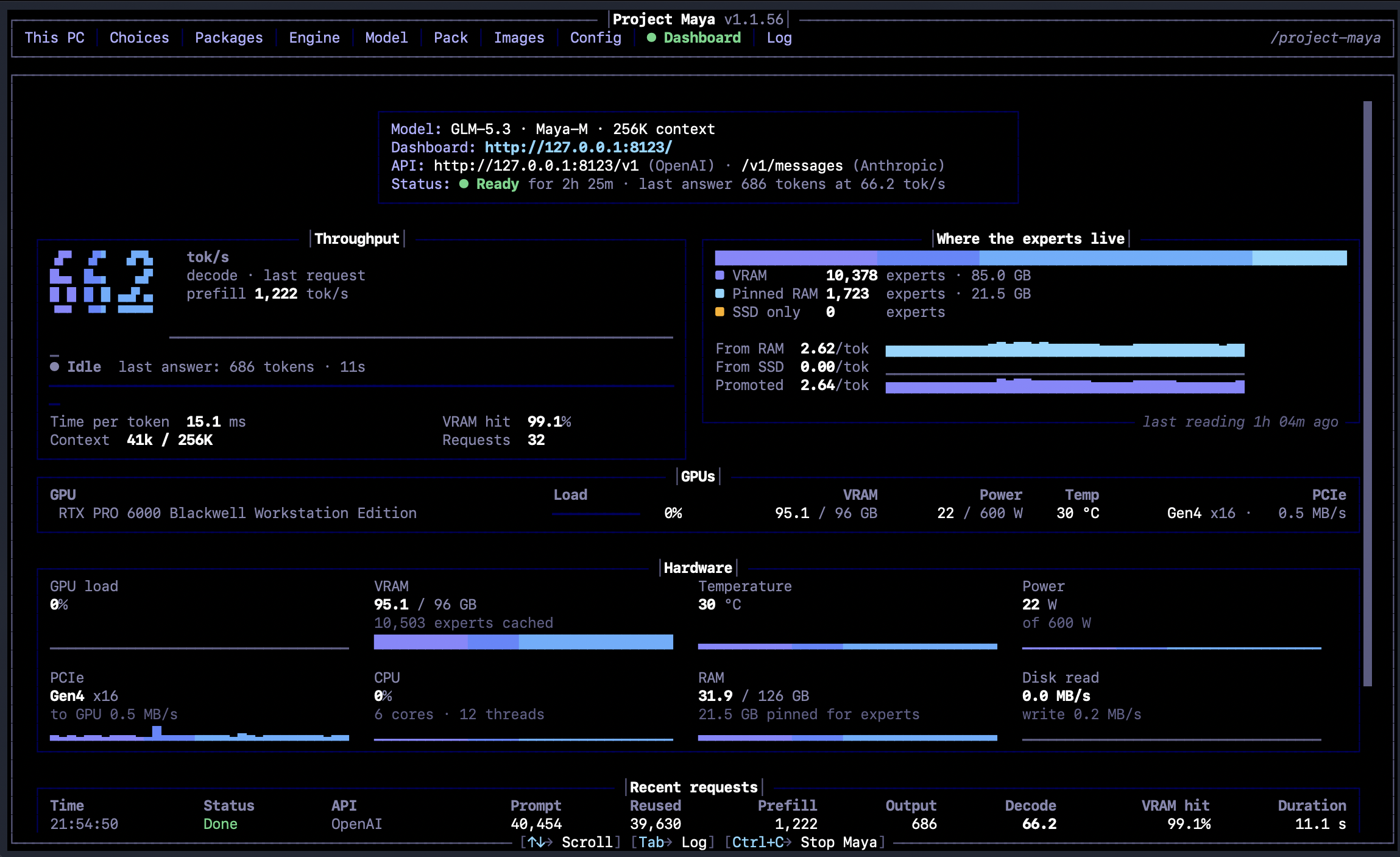
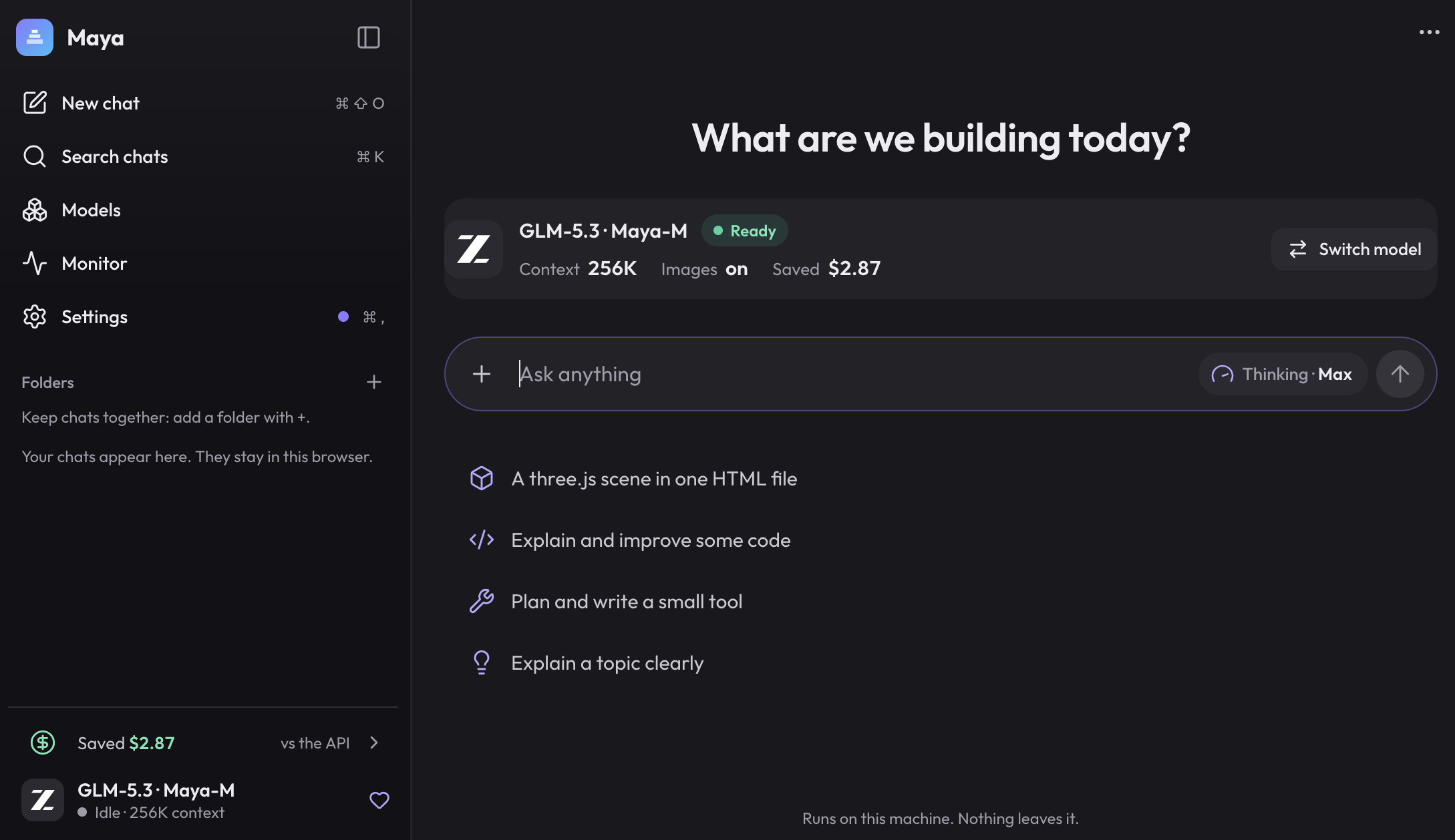
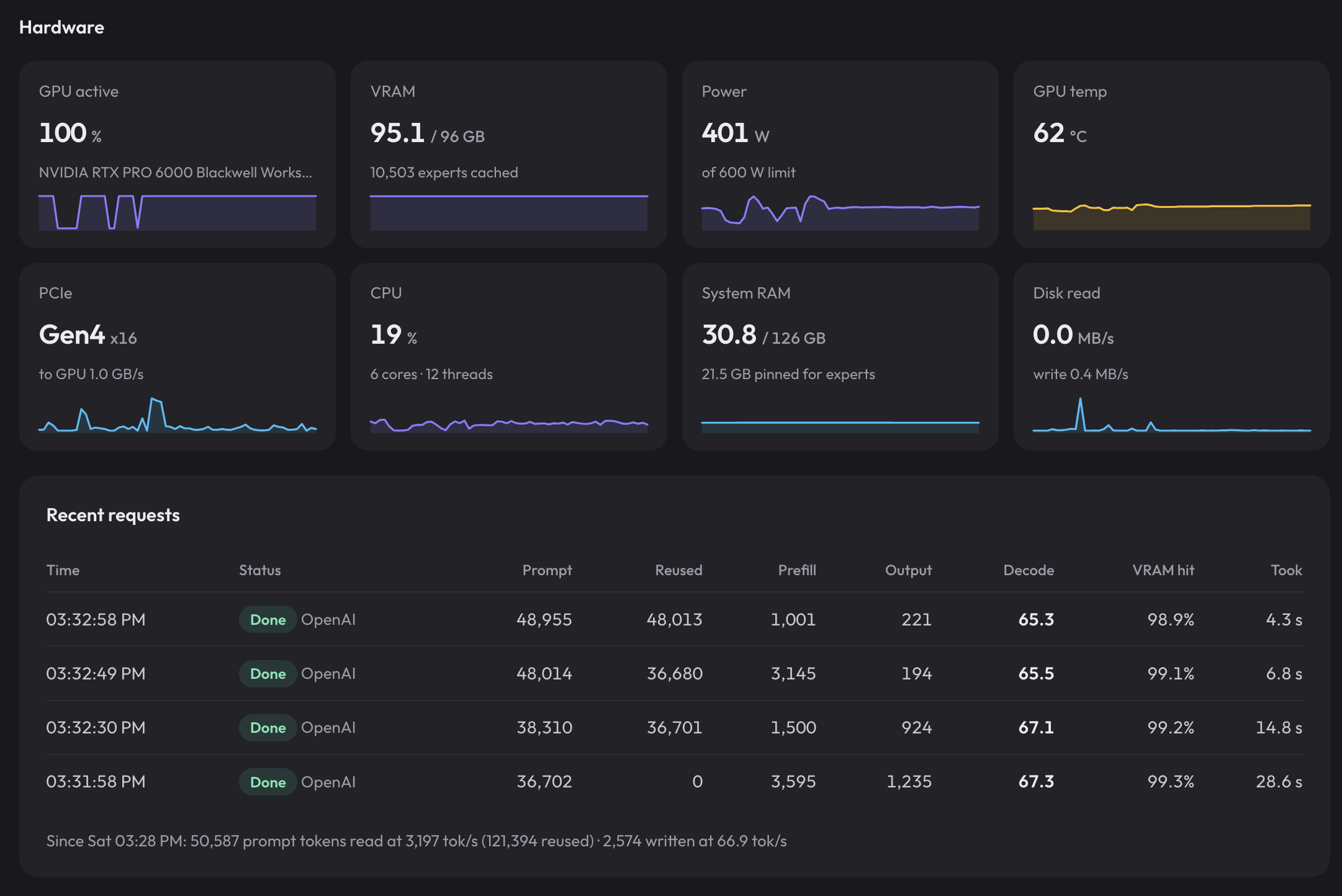
Project Maya comes with its own nice WebUI and terminal UI.
| Terminal | WebUI | ||||
|---|---|---|---|---|---|
 |  | ||||
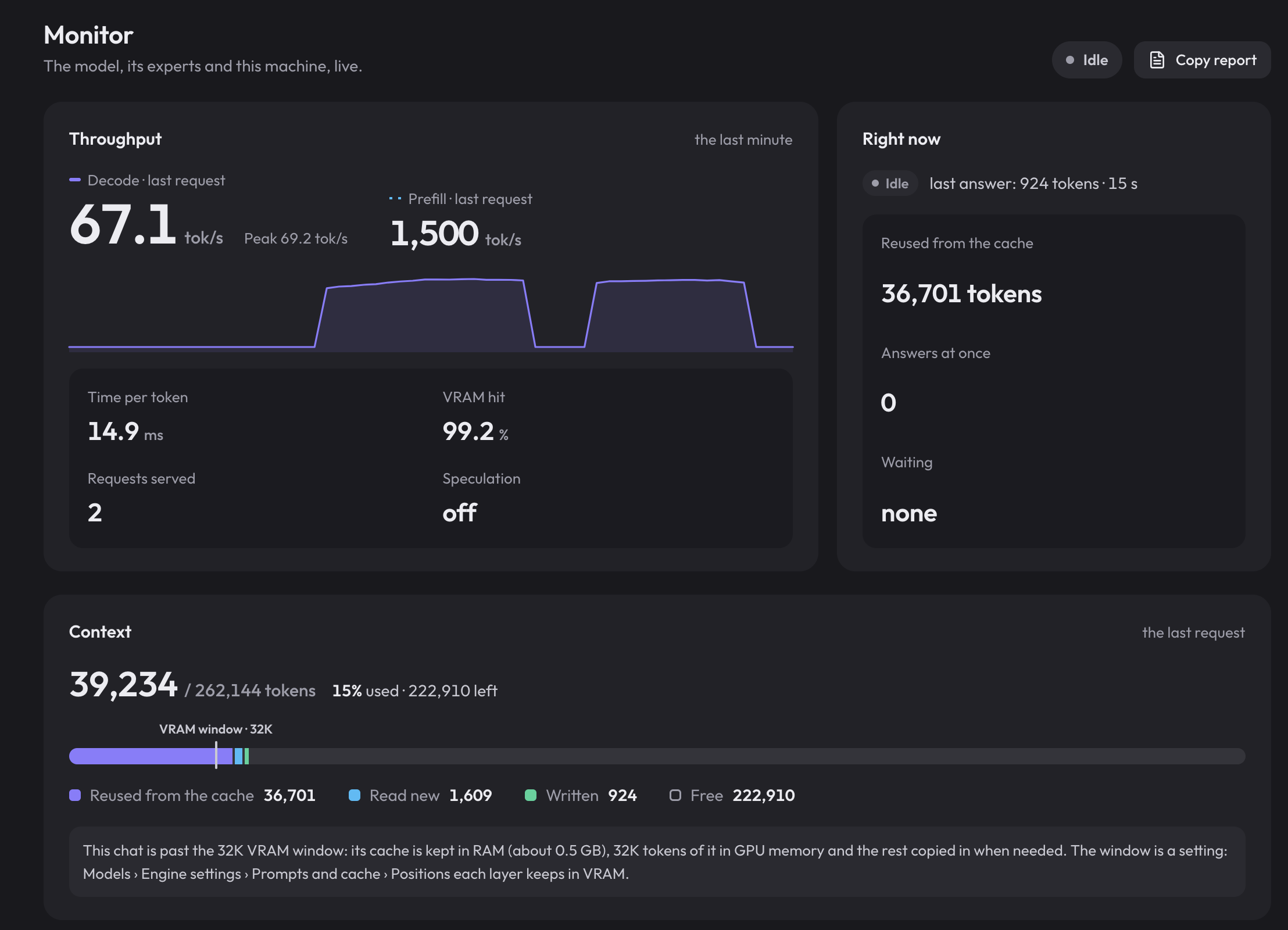
| WebUI Monitor Panel | |||||
 |  |  | |||
The primary characteristic between the models these engines advertise is lobotomized tiny quants. Yes, you’re getting 200 tok/s decode on your 2 x 3060 12gb rig, but at IQ1_S does it matter? I’ve been hesitant to dive in too much, but I’ve really wanted to try GLM-5.3-Flash so decided to set it up.

Expert cache is the primary point of intrigue here for me, but KV streaming from RAM and the overall 3-tier expert parking is an intelligent layout. I likely would have little interest in a model that tips beyond VRAM+RAM into SSD, but the option is interesting.
I went with the quant labeled “Maya-M” which shows as IQ2_S on HuggingFace since it was the right size to exceed my VRAM, but not by too much. Looking into the quant details in the model card it’s clear that ‘2-bit’ does undersell it to a degree:
| Tensors | Maya-M |
|---|---|
| Routed experts, gate and up (42 layers) | IQ2_S, rounded with error feedback |
| Routed experts, down | IQ3_S in the first and last four MoE layers, IQ3_XXS in the rest |
| Attention projections (KDA, MLA/DSA) and shared experts | Q6_K |
| The three dense layers, embeddings, output, MLA k_b / v_b | Q6_K |
| Small KDA projections, the DSA indexer | Q8_0 |
| Router, norms, stream-mixing weights | F32 |
| NextN draft layer experts | Q3_K (gate/up), Q4_K (down) |
Doing the math it’s really something more along 2.7-bit (or 2.9-bit if you go just off file size). Still a far step from the minimum 4-bit floor that has felt usable in other models I’ve tried.
My goal with this article is to measure GLM-5.3-Flash at this quant in this engine and determine if the deep quantization doesn’t render the model too damaged AND to consider the speed difference. My current “use 100% of my machine’s brain” model is Qwen3.8-flash-next-nvfp4. This would have to perform pretty impressively and token-efficiently for me to swap. I’ll start with a speed analysis, run the typical benchmark suites, and end with real world style in-harness uses.
Speed & Size
First things first, how fast is this model on my hardware? I originally configured the model to run with MTP, Maya’s measurements said that’s slower. I then tried with the dflash2 draft model - it once again measured and said no dice. So these numbers are without spec of any kind.
Prefill/Decode Sweep
Single stream synthetic sweep for a quick speed check. 512 tokens generated per run, prompt size walked from 1k out to the served --context 262144. Two reps per point; the charts and table are the mean of reps.
📊 Expand Speed Table
Each row is the mean of two reps; the last two columns are the engine’s own reported prefill/decode tok/s for comparison with the client-measured numbers:
| Prompt | Prompt tokens | TTFT | prefill tok/s | decode tok/s | srv prefill | srv decode |
|---|---|---|---|---|---|---|
| 1k | 944 | 0.71 s | 1,336 | 77.0 | 1,340 | 77.1 |
| 8k | 7,176 | 2.03 s | 3,535 | 68.3 | 3,646 | 68.4 |
| 32k | 28,547 | 7.47 s | 3,824 | 67.7 | 3,923 | 67.9 |
| 131k | 114,029 | 30.89 s | 3,691 | 64.4 | 3,748 | 64.6 |
| 262k | 228,004 | 66.58 s | 3,425 | 60.7 | 3,472 | 60.8 |
Overall VERY usable numbers. A 3.8k tok/s prefill and 68 tok/s decode at 32k is acceptable for chat and coding. It also maintained some nice stable numbers as context grew, never falling off a cliff. Still a far cry of the 16k / 160 tok/s I experience with Qwen3.8-flash-next-nvfp4 on vLLM.
Concurrency
Same synthetic prompt pushed through 1, 2, 4 and 8 concurrent clients. I of course had to increase the parallel count in the config to accomplish this (I reduced it after).
📊 Expand Concurrency Tables
Table one is the per-client experience - each cell is aggregate prefill tok/s · worst TTFT · per-client decode tok/s at that client count:
| Clients | agg prefill tok/s | TTFT (worst) | per-client decode tok/s | agg decode tok/s |
|---|---|---|---|---|
| 1 | 3,590 | 2.00 s | 70.4 | 70.4 |
| 2 | 3,690 | 3.89 s | 47.9 | 92.6 |
| 4 | 3,686 | 7.79 s | 28.9 | 108.4 |
| 8 | 3,614 | 15.89 s | 15.3 | 111.8 |
Table two is what the box as a whole puts out, aggregate decode tok/s, and how much of the theoretical 8x survived:
| Maya-M | |
|---|---|
| agg decode 1 → 8 | 70.4 → 111.8 (x1.59) |
| per-client retained at 8 | -78.3% |
Clearly not worth running concurrently, and a SUPER far fall behind what I see in vLLM with my golden child model. With that said, I was surprised to see the numbers at n=2 are actually still rather usable single stream and do add up to a net positive. If I needed to support 2 users who didn’t mind a middling decode performance this could be viable.
Size & memory
📊 Expand Memory Table
| Maya-M (Maya engine) | |
|---|---|
| Quant | IQ2_S, ~2.9-bit effective (experts ~2.7-bit, 2.5/3-bit mix) |
| VRAM used | 95 GiB of 96 |
| RAM used | 48.7 GiB of 128 |
| of which pinned for experts | 28 GiB |
| On disk | 116 GiB |
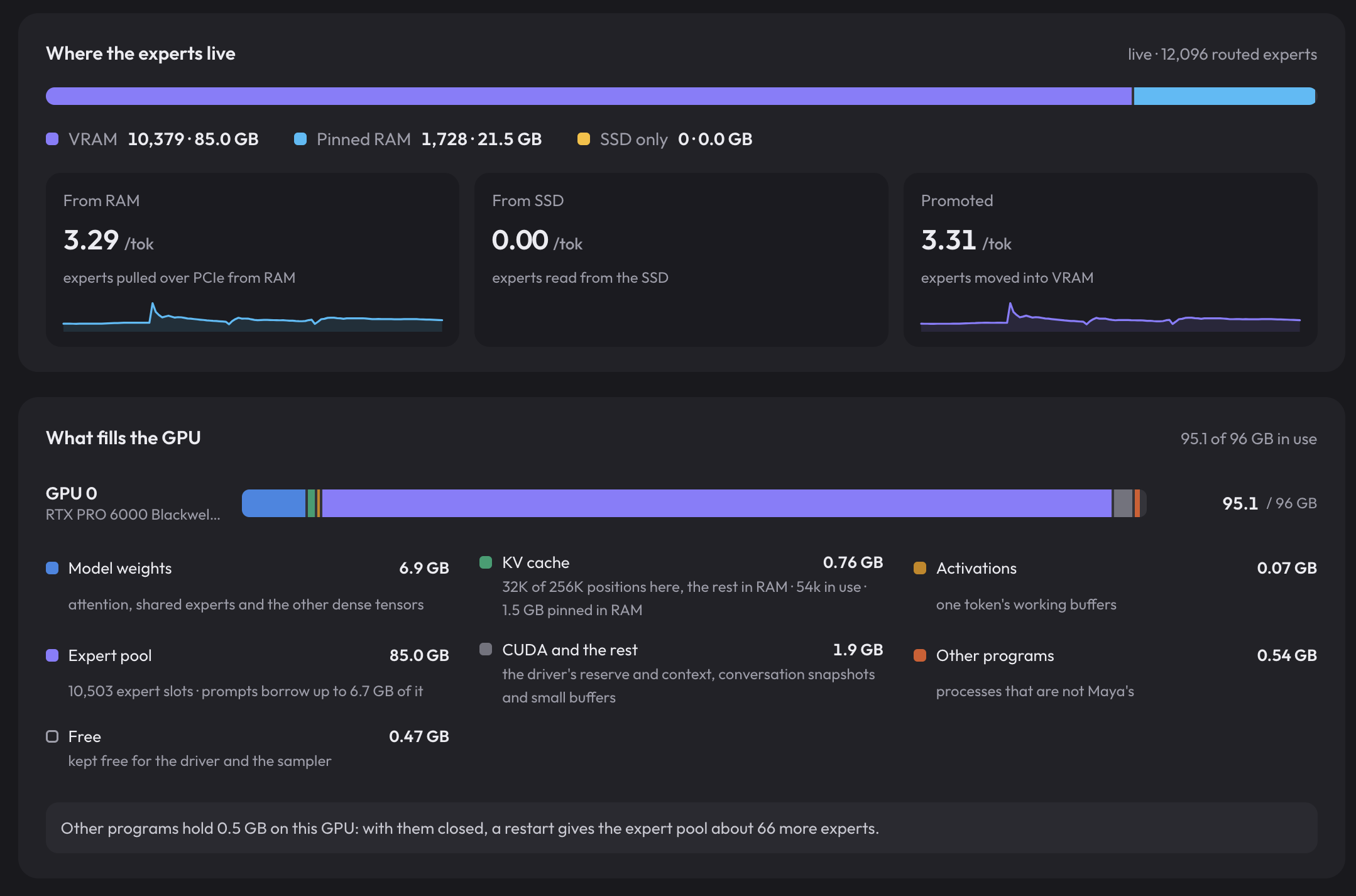
My hardware is nicely set up for this size model through this engine. 86% of the experts sit in VRAM, the rest in ram. Nothing spilled into SSD, so I didn’t really test the FULL stack this engine offers.
The GUI gives a nice breakdown of how everything lays out:
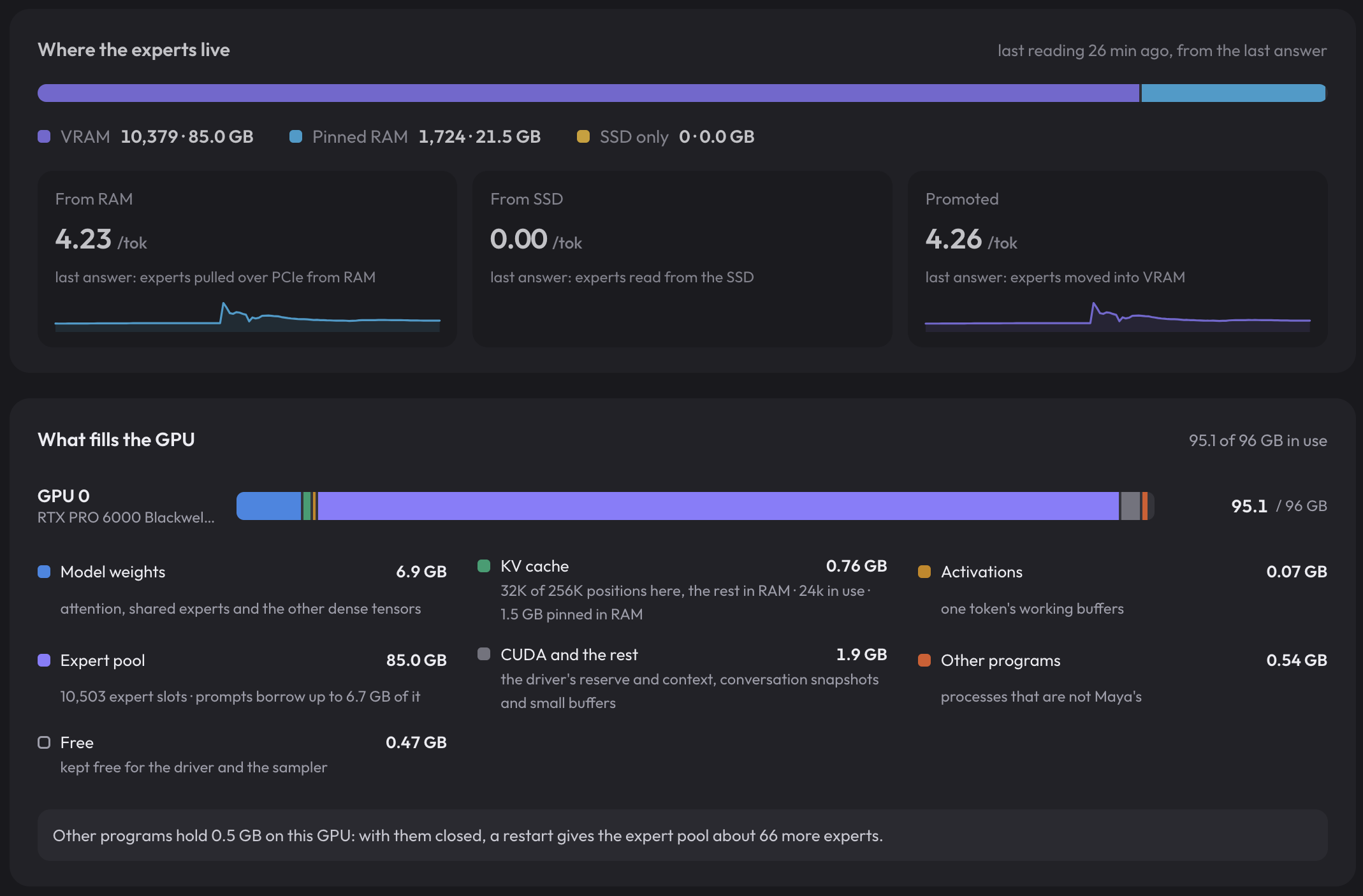
This also gives us a solid anchor to check the effectiveness of the expert cache. Throughout some early tests I saw cache hits range from 96.4% to 99.2%. This range CLEARLY beats a random expert pull against 86%, so the cache is a notable net win.
Traditional Benchmarks
note these are not comparable to leaderboards - different sample size, different Arena Hard judge.
All six typical suites, one model. Ran 5 Nov 2026 through Project Maya at server default temperature and 16k max tokens (64k for Arena-Hard), batch_size 1.
📊 Expand Benchmark Tables
Scores, as percentages:
| Suite | Samples | Maya-M (IQ2_S) |
|---|---|---|
| BFCL v4 | 300 | 79.00 |
| IFEval (prompt-strict) | 250 | 77.60 |
| MBPP+ | 378 | 92.06 |
| MMLU-Pro | 420 | 78.81 |
| Arena-Hard (winrate) | 75 | 90.91 |
| HumanEval+ | 164 | 86.59 |
| mean of the six | 84.16 |
IFEval’s other three variants (prompt-strict is what’s charted) - instruction-level strict 84.73, prompt-level loose 82.00, instruction-level loose 87.67.
BFCL v4 by subset, 50 samples each:
| Subset | Maya-M |
|---|---|
| simple_python | 98 |
| multiple | 88 |
| parallel | 86 |
| irrelevance | 62 |
| live_multiple | 72 |
| multi_turn_base | 68 |
MMLU-Pro by category, 30 samples each:
| Category | Maya-M | Category | Maya-M |
|---|---|---|---|
| biology | 96.67 | psychology | 76.67 |
| math | 93.33 | computer science | 73.33 |
| physics | 90.00 | health | 70.00 |
| chemistry | 86.67 | philosophy | 70.00 |
| business | 86.67 | other | 70.00 |
| economics | 86.67 | law | 63.33 |
| engineering | 80.00 | history | 60.00 |
Mean wall time per request. The harness runs its own concurrency, so this mixes scheduling in with generation. BFCL’s tracker counts the individual tool-turn requests (931) rather than the 300 samples, so its latency is per turn.
| Suite | Mean latency | Avg output t/s | Mean output tokens |
|---|---|---|---|
| BFCL v4 | 2.84 s | 55.7 | 158 |
| HumanEval+ | 1.77 s | 52.2 | 93 |
| IFEval | 5.46 s | 70.7 | 386 |
| MBPP+ | 3.73 s | 62.4 | 233 |
| MMLU-Pro | 2.74 s | 34.7 | 95 |
| Arena-Hard | 304.64 s | 38.7 | 11,792 |
These numbers are outright not impressive. The only of the 6 that are on-par with Qwen3.8-flash-next-nvfp4 is BFCL (Maya-M sits 1 percent higher). Every other value is notably behind. This suggests to me the aggressive quantization most likely hampers this model in all ways besides tool calls. These benchmarks aren’t everything though. As I’ve seen in other benchmark sets, real world use often doesn’t align.
Word500
Back to the puzzle benchmark - guess the five letter word given only the counts of letters in the right place, wrong place, or nowhere. Measures reasoning effectiveness and efficiency.
Details: 6 boards x 10 samples = 60 runs, temp 1.0 / top_p 0.95, max_tokens: 64000, concurrency 1, loop-abort at 10 consecutive repeats. Three boards (Smoke, Poker, Hoard) each run twice: once as a screenshot, once as text only.
📊 Expand Word500 Table
| Board | Correct | Accuracy | Format ok | Avg tokens | Max tokens |
|---|---|---|---|---|---|
| Smoke | 9/10 | 90% | 0/10 | 13,962 | 33,040 |
| Poker | 7/10 | 70% | 2/10 | 21,021 | 32,780 |
| Hoard | 10/10 | 100% | 1/10 | 18,707 | 25,716 |
| Smoke (text) | 10/10 | 100% | 10/10 | 8,912 | 12,519 |
| Poker (text) | 9/10 | 90% | 10/10 | 23,666 | 32,791 |
| Hoard (text) | 10/10 | 100% | 10/10 | 16,498 | 32,784 |
| overall | 55/60 | 91.67% | 33/60 (55%) | 17,128 | 33,040 |
Overall token stats: total 1,027,653 · median 16,124 · min 5,444 · max 33,040. Two loop aborts (both on the Poker board), zero truncated answers.
Maya-M pulled off a big 55/60 correct result, which puts it on par with Qwen3.8-flash-next-nvfp4 (my benchmark leader) with a big caveat: the vision boards essentially never followed the single-word format (3 of 30). It consistently produced responses in the format of ANSWER [explanation]. I’ve actually only seen tiny models that outright can’t handle the benchmark at all fail to format their answer correctly. Going further, the average token count of 17k is very good, also within error of our current leader’s numbers.
It’s important to observe there generally seems to be a reduction in capability when vision is involved. With just text boards provided, the model only missed one guess. Meanwhile in the vision-testing puzzles it missed 3 more. I would need to run a whole lot more reps to determine the significance, but with how long these runs take with this model that’s not in the cards. Just consider, the mmproj might be a weaker avenue for this model.
In-Harness Tests
Curated suites need something to anchor them to reality. These are the same in-harness jobs I ran in the Swift1.5 NVFP4 comparison (and Spark-X2.6 before that), so Maya-M lines up directly against the models in those entries.
Open-WebUI Chat - Search, Reasoning, Function Calling
The same two-turn job:
- Can you find a few recently released unified memory systems with 128gb+ ram and compare their prices/availability/pros and cons?
- Can you format that information into a single page pdf so i can share it?
Same expectations as the prior entries: Nvidia RTX/DGX Spark, the M_ Ultra Mac Studios, the various Ryzen AI Max 395 mini pcs, MSRP, real prices, and pros/cons covering availability, memory size, bandwidth and compute. And of course it needs to find and call the PDF creation tool sitting in the harness.
Results
Maya-M (Project Maya · ~2.9-bit)
Open PDF ↗Perfectly handled task creation, update, and closure. Modulated n for search counts based on the complexity of each search and fetched when appropriate. Cleanest behavior seen on this test so far. Found up-to-date and relevant information, synthesized the report well, and checked the length then revised it to fit the one page ask.
The cleanest result I’ve had with a model in this harness. Most expected contenders can get the search -> fetch tool pattern, fewer properly set the search result count, and not a single other has handled the task creation, update, and closure this well. Very impressed by the model’s behavior and results. The output is accurate to the requirements and formatted cleanly.
Pelican on a Bicycle
The classic silly prompt, as always.
Generate an SVG of a pelican riding a bicycle
Maya-M (Project Maya · ~2.9-bit)
Open SVG ↗Probably the best pelican of any model run locally so far. Anatomy is great, the bicycle is perfect, and the layering is super clean.

Once again, killed it. This is the best pelican I’ve seen rendered in this test in my harness. Look at the tasteful thickness of the beak. The bicycle is perfectly designed. The layering with the leg behind the bike is incredible. You can compare it here to 3 different Qwen3.8-flash-next quants and here for another few (smaller) models that have done well.
Plex recommendation app
In VScode + Cline - A big, messy, directionless 1-shot attempt at a sort of application I may employ the model to create:
Create a docker compose compatible web app that users can log into with a Plex account to browse popular shows/movies and be given show/movie recommendations based on their watch history and ratings.
First attempts:
The model was able to almost reach a functional state with no input. The Plex login functionality worked, but upon load it suggested it had no TMDB API key despite me providing it in the .env. One quick prompt did clear that issue and get the primary browse page working.
| Plex login | Main screen |
|---|---|
 |  |
The TMDB key detour:
 |
Further refinement prompts:
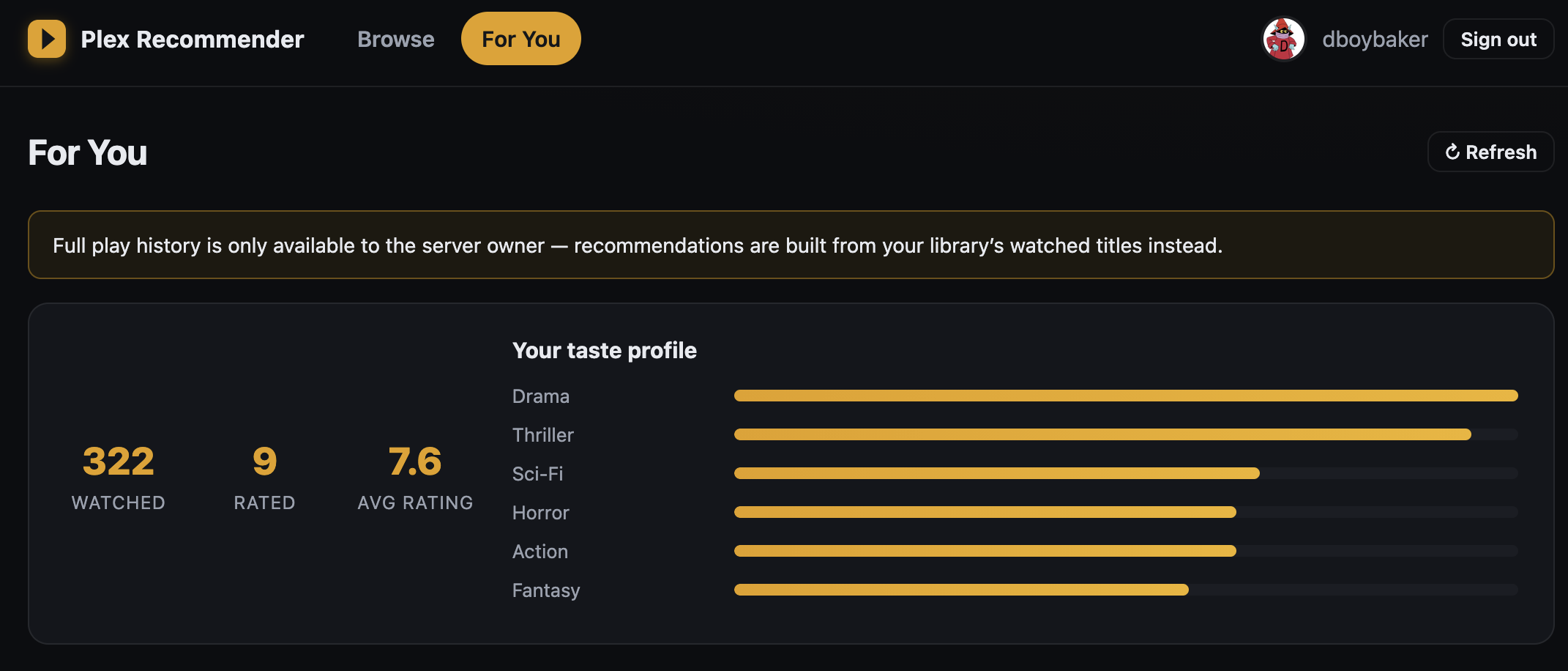
Despite the Browse page being functional, the For You was not. It simply couldn’t pull watch history or ratings from Plex. It took a few back and forths including me providing a link to the Plex API documentation for the model to succeed at all. But once I did things looked great.
| For You, failing | For You, fixed | |
|---|---|---|
 |  |  |
| Maya-M | |
|---|---|
| First response | Functional stack, good choice in TMDB integration. |
| Plex auth | built correctly; container starts and login works |
| TMDB key | popup claimed it was missing despite it sitting in the .env |
| Prompts to fix TMDB key | 1 |
| Watch history → recommendations | needed a few rounds of prompts plus links to the Plex API docs |
| 1-shot? | no |
Just like the qwen3.8-flash-next quants in the Swift1.5 comparison, this problem is too much for a 1-shot for this model in this harness, but it is certainly within the realm of capable with a modicum of research and planning. I’d actually say I preferred both UIs created by Qwen3.8-flash-next in my prior test and liked how they both came up with a creative name.
Designing a server case
In Hermes harness - This is another real world test that mirrors a project I’ve been working on - I’ve designed and built a new case for my LLM rig. Could it 1-shot a 3D representation of the efficient build I brainstormed over weeks? Probably not, but let’s see what it output.
Let’s design a case for a server that supports standard ATX motherboard and power supply. It should support an RTX 6000 Blackwell and an Evga 3090 FTW3.
The primary focus should be keeping the case compact and maximizing airflow.
Your output should be a 3D representation of the case for easy viewing.
The viewer below is the real artifact, drag to orbit and scroll to zoom. Three.js, loaded from a CDN, in a self-contained page. Expand to load it.
🖥 Maya-M build - dual-GPU ATX airflow case, 33.4 L (200 × 459 × 364 mm), interactive 3D
- By far the best of the 3 models I’ve run this test on - the resulting model is extremely clear and could nearly actually be built.
- The design is a little confused about which side of the motherboard is the back, and where the fans should go.
- It made a big assumption that the motherboard PCIe spacing is large enough to leave a gap between the two GPUs - which is uncommon.
- Overall the model is clean, includes airflow, modifiable views, clean labels. Did mislabel the units on some measurements (feet vs in).
ONE MILLION CONTEXT
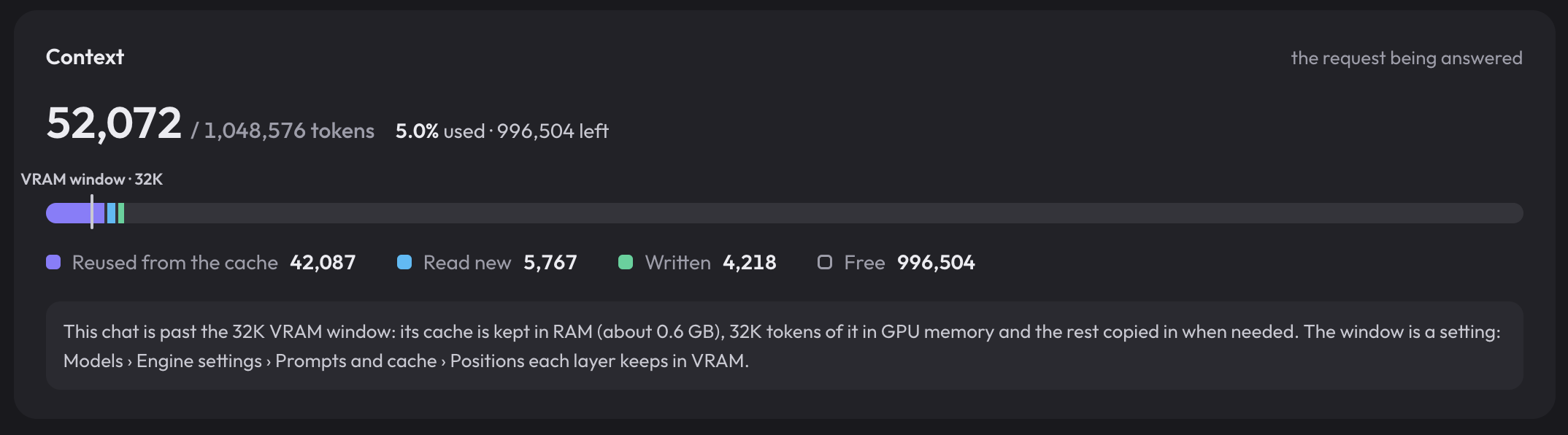
One of the benefits I really didn’t take advantage of with Maya + GLM-5.3-Flash is KV residing in RAM and the model’s native 1M max context. I figured as a bonus I’d reconfigure to sample the performance at this increased value and test how well the system handles tossing the KV over PCIE.
1M Speed
Same single stream sweep, this time with the served context raised to the model’s native 1M. 512 tokens generated per run, prompt size walked from 1k out to --context 1048576. Two reps per point; the charts are the mean of reps.
📊 Expand Speed Table
Each row is the mean of two reps; the last two columns are the engine’s own reported prefill/decode tok/s for comparison with the client-measured numbers:
| Prompt | Prompt tokens | TTFT | prefill tok/s | decode tok/s | srv prefill | srv decode |
|---|---|---|---|---|---|---|
| 1k | 944 | 0.73 s | 1,288 | 76.2 | 1,294 | 76.4 |
| 8k | 7,176 | 2.12 s | 3,379 | 68.0 | 3,484 | 68.2 |
| 32k | 28,546 | 7.82 s | 3,652 | 67.7 | 3,737 | 67.9 |
| 131k | 114,029 | 32.26 s | 3,535 | 63.3 | 3,585 | 63.5 |
| 262k | 228,004 | 69.22 s | 3,294 | 59.8 | 3,338 | 60.0 |
| 524k | 455,956 | 158.09 s | 2,884 | 54.5 | 2,917 | 54.6 |
| 1M | 911,859 | 394.47 s | 2,312 | 46.8 | 2,332 | 46.9 |
Even at 1M ctx this is genuinely usable. Sure you’re waiting for 6.5min for your first token, but in situations where you truly need it the prefill and decode are still well within usable range. I’m impressed how well this holds up to a huge KV cache. There really isn’t much downside to having this option as long as you have the spare RAM.
Conclusion
tl;dr
- Speed is real. Maya does an excellent job finding the best configuration for your hardware.
- Quality does take a beating. The deep quant is not free, hamstringing benchmark performance, but in real use I couldn’t feel it. Followed instructions and handled my tests in various harnesses as well or better than Qwen3.8-flash-next-nvfp4.
- Token-efficient, coding capable, and by my observation better at natural sounding prose.
- Speed scales well into the full 1M context supported by GLM-5.3-Flash
I do like how this model feels in the hand, but where I feel it the gap is only marginally better than my existing best-in-slot. The speed sacrifice on the other hand is substantial. What Maya is doing is notable, unlocking models for subpar hardware, but I still think a smaller model at a more reasonable quantization is the way to go.
If I find some time I may repeat the benchmarks with Maya-L (156GB), or try to get the engine to run a Q4_K_XL (200GB) gguf instead. The 156GB gguf would stress my ram a bit more, and the 200GB one would nearly max it but be in line with quality I’d actually like. I’d also like to try DSV4.1-Flash with the engine.